
M
MacRumors
Guest
Author: Sami Fathi
Reviews for the iPhone 14 Pro and iPhone 14 Pro Max have been published, offering a more detailed look at Apple's new high-end phones and all they have to offer, including an always-on display.
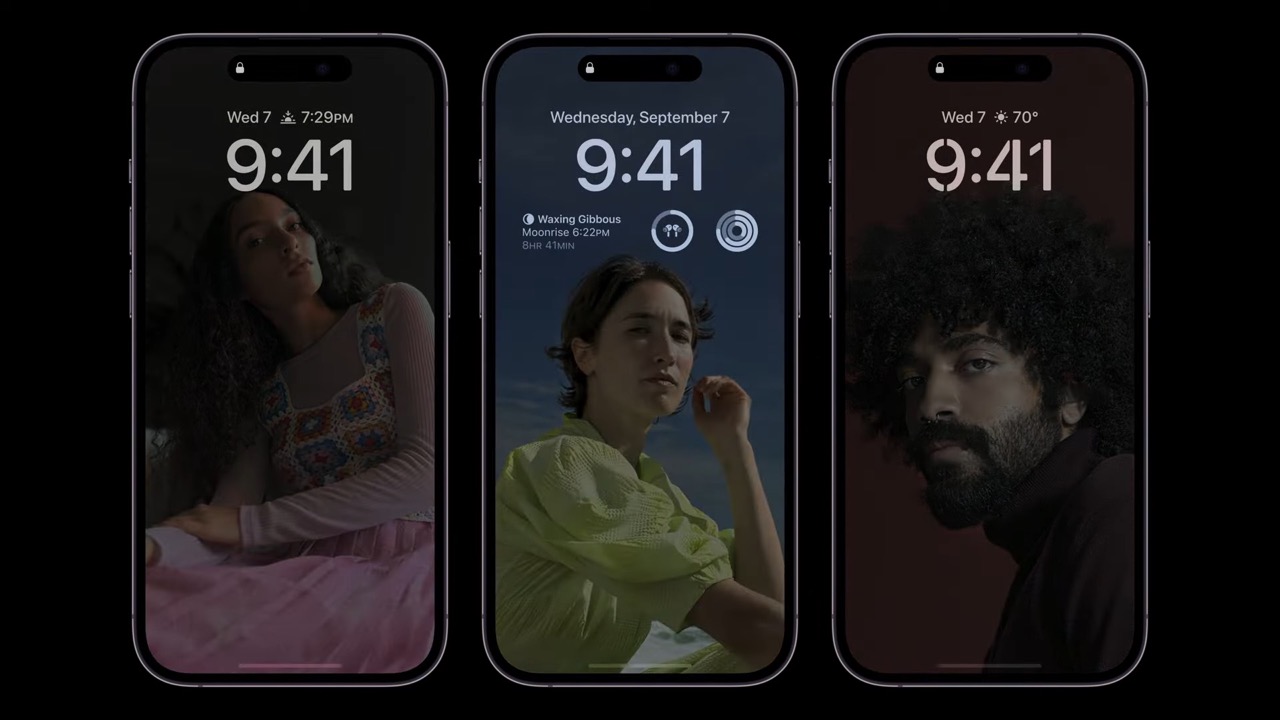
One detail confirmed today by the reviews is that the always-on display features no customization features, as it only displays a tinted version of a user's iOS 16 Lock Screen wallpaper, widgets, and Live Activities, if any are actively running. Users can't customize the always-on display, such as what information it chooses or whether it shows a darkened wallpaper or a black background.
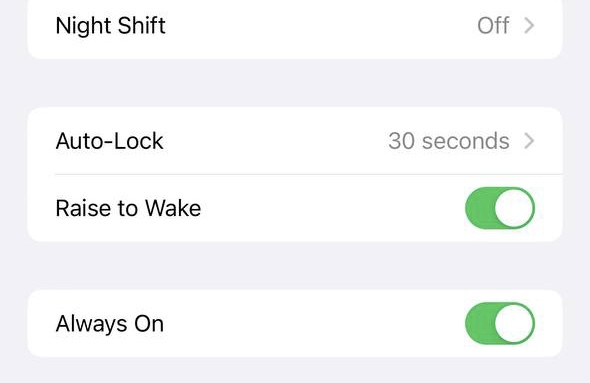
Users can, however, disable the always-on display entirely from within the Display and Brightness section of Settings. Reviewers noted that it's too early to tell whether or not the always-on display has a material impact on battery life, so we'll have to wait a few weeks before we know its effect.
The new iPhone 14 Pro and iPhone 14 Pro Max feature more power-efficient OLED displays with a variable refresh rate as low as 1Hz. This is just one of several power-saving features that the iPhone 14 Pro has for the always-on display. Today we learned from Engadget that in order to limit the impact of the always-on display on battery life, the iPhone 14 Pro prerenders individual frames for elements that predictably change, such as the time, and feeds them to the always-on display when appropriate.
As reported earlier this week, the iPhone 14 Pro intelligently detects if a user who's wearing an Apple Watch paired with the iPhone leaves the room, and when they do, it will disable the always-on display.
By disabling the always-on display when a user leaves the room, the iPhone 14 Pro saves battery life and helps safeguard privacy as the display doesn't show a user's wallpaper and widgets when they're not present.
Related Roundup: iPhone 14 Pro
Buyer's Guide: iPhone 14 Pro (Buy Now)
Related Forum: iPhone
This article, "iPhone 14 Pro's Always-On Display: No Customization Features, Battery Life Saving Techniques, and More" first appeared on MacRumors.com
Discuss this article in our forums
Continue reading...
Reviews for the iPhone 14 Pro and iPhone 14 Pro Max have been published, offering a more detailed look at Apple's new high-end phones and all they have to offer, including an always-on display.
One detail confirmed today by the reviews is that the always-on display features no customization features, as it only displays a tinted version of a user's iOS 16 Lock Screen wallpaper, widgets, and Live Activities, if any are actively running. Users can't customize the always-on display, such as what information it chooses or whether it shows a darkened wallpaper or a black background.
Users can, however, disable the always-on display entirely from within the Display and Brightness section of Settings. Reviewers noted that it's too early to tell whether or not the always-on display has a material impact on battery life, so we'll have to wait a few weeks before we know its effect.
The new iPhone 14 Pro and iPhone 14 Pro Max feature more power-efficient OLED displays with a variable refresh rate as low as 1Hz. This is just one of several power-saving features that the iPhone 14 Pro has for the always-on display. Today we learned from Engadget that in order to limit the impact of the always-on display on battery life, the iPhone 14 Pro prerenders individual frames for elements that predictably change, such as the time, and feeds them to the always-on display when appropriate.
As reported earlier this week, the iPhone 14 Pro intelligently detects if a user who's wearing an Apple Watch paired with the iPhone leaves the room, and when they do, it will disable the always-on display.
By disabling the always-on display when a user leaves the room, the iPhone 14 Pro saves battery life and helps safeguard privacy as the display doesn't show a user's wallpaper and widgets when they're not present.
Related Roundup: iPhone 14 Pro
Buyer's Guide: iPhone 14 Pro (Buy Now)
Related Forum: iPhone
This article, "iPhone 14 Pro's Always-On Display: No Customization Features, Battery Life Saving Techniques, and More" first appeared on MacRumors.com
Discuss this article in our forums
Continue reading...