
M
MacRumors
Guest
Author: Tim Hardwick
In iOS 15, Apple's Maps app benefits from a range of new features and improvements, including the ability to use augmented reality walking directions in big cities.

In a nod to Google Maps, the new AR mode can map walking directions onto the real world by using your iPhone's rear camera, making it easier to see where you need to go in built-up areas and reducing the need to look down at your smartphone as you move.
First, initiate a walking route, then simply raise your iPhone and scan the buildings around you when prompted. The step-by-step directions will appear in the AR mode automatically, which should make it easier to get where you need to go, especially in situations where the directions are tricky.
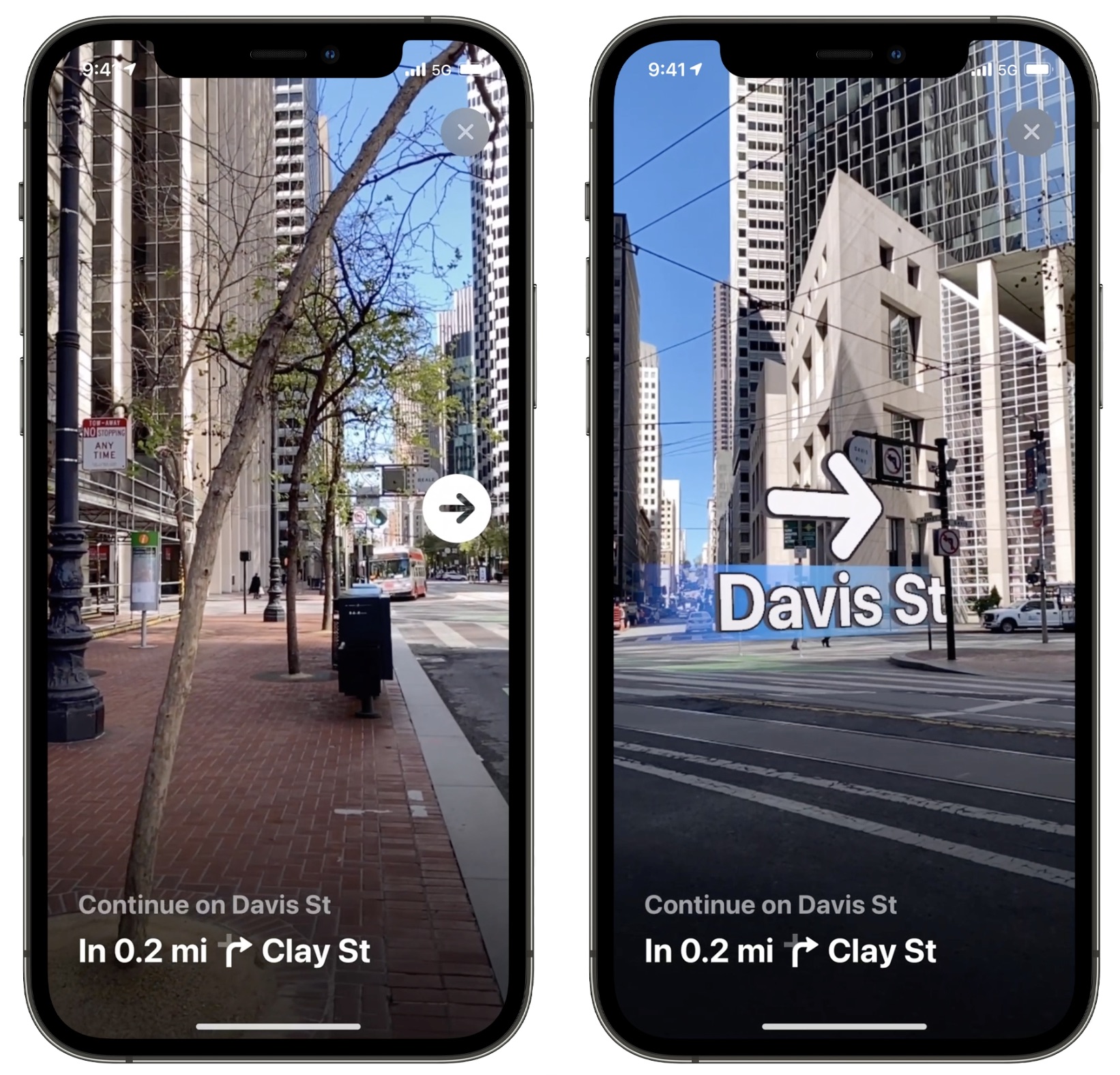
The AR feature is available from late 2021 in major supported cities including London, Los Angeles, New York, Philadephia, San Diego, San Francisco and Washington DC.
Note that to get augmented reality walking directions, your iPhone will need an A12 chip or later. The A12 was first used in the iPhone XS, XS Max, and XR, which came out in 2018, which means that iPhones released after 2018 are compatible with the AR feature.
Related Roundups: iOS 15, iPadOS 15
Tag: Apple Maps
Related Forum: iOS 15
This article, "iOS 15: How to Get AR Walking Directions in Maps" first appeared on MacRumors.com
Discuss this article in our forums


Continue reading...
In iOS 15, Apple's Maps app benefits from a range of new features and improvements, including the ability to use augmented reality walking directions in big cities.
In a nod to Google Maps, the new AR mode can map walking directions onto the real world by using your iPhone's rear camera, making it easier to see where you need to go in built-up areas and reducing the need to look down at your smartphone as you move.
First, initiate a walking route, then simply raise your iPhone and scan the buildings around you when prompted. The step-by-step directions will appear in the AR mode automatically, which should make it easier to get where you need to go, especially in situations where the directions are tricky.
The AR feature is available from late 2021 in major supported cities including London, Los Angeles, New York, Philadephia, San Diego, San Francisco and Washington DC.
Note that to get augmented reality walking directions, your iPhone will need an A12 chip or later. The A12 was first used in the iPhone XS, XS Max, and XR, which came out in 2018, which means that iPhones released after 2018 are compatible with the AR feature.
Related Roundups: iOS 15, iPadOS 15
Tag: Apple Maps
Related Forum: iOS 15
This article, "iOS 15: How to Get AR Walking Directions in Maps" first appeared on MacRumors.com
Discuss this article in our forums
Continue reading...