
M
MacRumors
Guest
Author: Tim Hardwick
In iOS 15, Apple is bringing several enhancements to FaceTime, and now you can do more than just FaceTime call your friends and family.

Thanks to a new screen sharing feature called SharePlay, you can share your screen with other people on a call, which is great for choosing a movie, browsing through a photo album, or anything else that's enhanced by group discussion. Here's how the new screen sharing feature works.

Continue reading...
In iOS 15, Apple is bringing several enhancements to FaceTime, and now you can do more than just FaceTime call your friends and family.
Thanks to a new screen sharing feature called SharePlay, you can share your screen with other people on a call, which is great for choosing a movie, browsing through a photo album, or anything else that's enhanced by group discussion. Here's how the new screen sharing feature works.
- Launch FaceTime on your iPhone or iPad.
- Tap New FaceTime and add the contacts that you want to share your screen with, then tap the FaceTime button. Alternately, select a recent contact to initiate a video call.

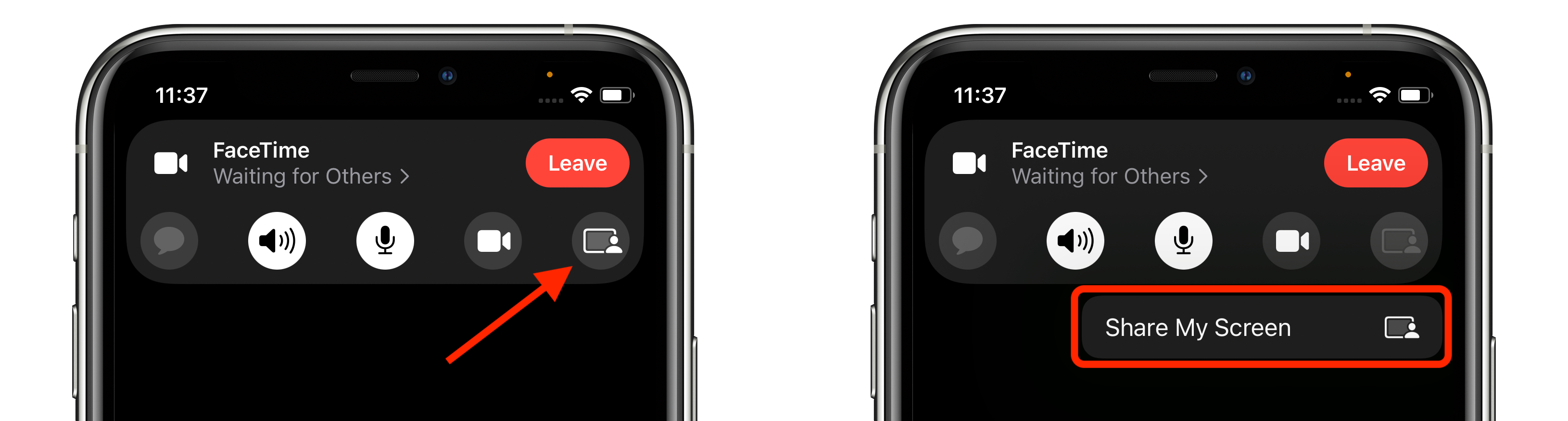
- When the call has connected, tap the SharePlay button at the top-right corner of the screen in the new control panel.
- Tap Share My Screen in the dropdown. After a three-second countdown, screen sharing should initialize.
- Once FaceTime screen sharing has started, you can navigate to any app that you want to share with the callers. A sharing icon will remain in the top-left corner of the screen to indicate that FaceTime screen sharing is active, and you can tap it to reveal the FaceTime control panel.

You can swipe away the active caller's face for more screen space, and swipe them back into view just as easily. If you're viewing someone else's shared screen, you'll see their name just below the top-left icon, alongside buttons to send them a message, Love what they're sharing, or share it with someone else.
If you like, you can also listen to music or watch movies and TV together using the SharePlay interface. You can stream movies or TV shows and everyone on the call will see the same synced playback and controls. For more on what's new with FaceTime in iOS 15, we have a dedicated guide that highlights all of the available features.
Related Roundups: iOS 15, iPadOS 15
Tag: FaceTime
Related Forum: iOS 15
This article, "iOS 15: How to Share Your Screen on a FaceTime Call" first appeared on MacRumors.com
Discuss this article in our forums
Continue reading...